十次方项目-day04
第四章 - 消息通知系统
1 消息通知的业务场景
消息通知微服务的定位是“平台内”的“消息”功能,分为全员消息,订阅类消息,点对点消息。例如系统通知,私信,类消息
全员消息
系统通知,活动通知,管理员公告等全部用户都会收到的消息
订阅类消息
关注某一类数据的用户,该类数据有更新时向用户发送的消息。例如关注某位大v的微博,公众号,订阅某位知名作家的专栏
点对点消息
某位用户对另外一位用户进行操作后,系统向被操作的用户发送的消息。例如点赞,发红包。
2 消息通知与即时通讯的区别
| 即时通信 | 消息通知 | |
|---|---|---|
| 传输的内容 | 包括文字聊天、语音消息发送、文件传输、音视频播放等吗,内容极其丰富。 | 以文字,超链接为主,辅以图片,不能再多了。 |
| 核心需求点 | 要求连接稳定可靠。就像网络游戏,如果总是掉线,你还玩的下去吗? | 要求消息的高送达率,也就是说“这件事儿一定要想尽办法通知到对方”。对延时要求不高。 |
| 系统建设成本 | 存储成本高(图片,视频等)。基于TCP协议,需建设或租用多线机房,基建成本高。 | 一般只保存文本消息,存储成本低。可根据用户量自由调整服务器集群配置。 |
| 交互方式 | 任何消息均可回复 | 消息一般被设计为“仅通知,不需要回复” |
| 技术实现 | XMPP,MQTT,Strophe等全双工长连接协议 | JMS,AMQP,http等等各种协议 |
3 搭建消息通知微服务
3.1 业务分析
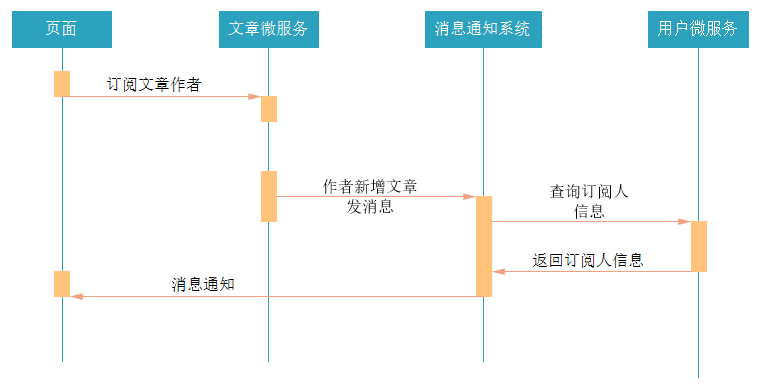
用户可以对文章作者进行订阅,当被订阅的用户发布新的文章时,可以通过消息通知系统发送消息给订阅者。
流程如下:
3.2 表结构分析
把资料中的sql脚本导入到数据库中,创建数据库和表。
十次方消息通知微服务总共需要两张数据库表,tb_notice 和 tb_notice_fresh。
消息通知表tb_notice
保存用户的消息通知
| 字段名 | 类型 | 字段说明 |
| ————— | ———— | —————————————————- |
| id | int | ID|
| receiverId | varchar | 接收消息用户的ID(userId)|
| operatorId | varchar | 进行操作用户的ID |
| action | varchar | 操作类型(评论,点赞等)|
| targetType | varchar | 被操作的对象,例如文章,评论等|
| targetId | varchar | 被操作对象的id,例如文章的id,评论的id|
| createtime | datetime | 发表日期|
| type | varchar | 消息通知类型|
| state | varchar | 状态:0 未读;1 已读|待推送消息表 tb_notice_fresh
保存准备推送给用户的消息通知
| 字段名 | 类型 | 字段说明 |
| ———— | ———- | ————|
| noticeId | varchar | 通知id |
| userId | varchar | 用户ID |
3.3 搭建消息通知微服务
在tensquare_parent父工程下创建tensquare_notice子模块
修改pom.xml文件,添加下面的配置
1
2
3
4
5
6
7
8
9
10
11
12
13
14
15
16
17
18
19
20
21
22
23
24
25
26
27
28
29
30
31
32
33
34
35
36
37
38
39
40
41
42
43
44
45<dependencies>
<!-- mybatis-plus begin -->
<dependency>
<groupId>com.baomidou</groupId>
<artifactId>mybatisplus-spring-boot-starter</artifactId>
<version>1.0.5</version>
</dependency>
<dependency>
<groupId>com.baomidou</groupId>
<artifactId>mybatis-plus</artifactId>
<version>${mybatisplus.version}</version>
</dependency>
<!-- mybatis-plus end -->
<dependency>
<groupId>com.alibaba</groupId>
<artifactId>druid-spring-boot-starter</artifactId>
<version>1.1.22</version>
</dependency>
<dependency>
<groupId>mysql</groupId>
<artifactId>mysql-connector-java</artifactId>
<version>5.1.47</version>
</dependency>
<dependency>
<groupId>com.tensquare</groupId>
<artifactId>tensquare_common</artifactId>
<version>1.0-SNAPSHOT</version>
</dependency>
<dependency>
<groupId>org.springframework.boot</groupId>
<artifactId>spring-boot-starter-data-redis</artifactId>
<version>2.1.4.RELEASE</version>
</dependency>
<dependency>
<groupId>org.springframework.cloud</groupId>
<artifactId>spring-cloud-starter-netflix-eureka-client</artifactId>
<version>2.1.2.RELEASE</version>
</dependency>
<dependency>
<groupId>org.springframework.cloud</groupId>
<artifactId>spring-cloud-starter-openfeign</artifactId>
<version>2.1.2.RELEASE</version>
</dependency>
</dependencies>在resources文件夹下添加application.yml文件,并添加下面的配置
1
2
3
4
5
6
7
8
9
10
11
12
13
14
15
16
17
18
19
20
21
22
23
24
25
26
27
28
29
30
31
32
33
server:
port: 9014
spring:
application:
name: tensquare-notice
datasource:
driver-class-name: com.mysql.jdbc.Driver
url: jdbc:mysql://8.140.127.197:3306/tensquare_notice?characterEncoding=utf-8
username: root
password: root
redis:
host: 8.140.127.197
# Mybatis-Plus 配置
mybatis-plus:
# mapper-locations: classpath:/mapper/*Mapper.xml
#实体扫描,多个package用逗号或者分号分隔
typeAliasesPackage: com.tensquare.notice.pojo
global-config:
id-type: 1 #0:数据库ID自增 1:用户输入id
db-column-underline: false
refresh-mapper: true
configuration:
map-underscore-to-camel-case: true
cache-enabled: true #配置的缓存的全局开关
lazyLoadingEnabled: true #延时加载的开关
multipleResultSetsEnabled: true #开启延时加载,否则按需加载属性
log-impl: org.apache.ibatis.logging.stdout.StdOutImpl #打印sql语句,调试用
eureka:
client:
service-url:
defaultZone: http://127.0.0.1:6868/eureka/
instance:
prefer-ip-address: true编写启动类
1
2
3
4
5
6
7
8
9
10
11
12
13
14
15
16
17
18
19
20
import org.springframework.boot.SpringApplication;
import org.springframework.boot.autoconfigure.SpringBootApplication;
import org.springframework.cloud.netflix.eureka.EnableEurekaClient;
import org.springframework.cloud.openfeign.EnableFeignClients;
import org.springframework.context.annotation.Bean;
import util.IdWorker;
public class NoticeApplication {
public static void main(String[] args) {
SpringApplication.run(NoticeApplication.class,args);
}
public IdWorker createIdWorker(){
return new IdWorker(1,1);
}
}编写pojo
1
2
3
4
5
6
7
8
9
10
11
12
13
14
15
16
17
18
19
20
21
22
public class Notice implements Serializable {
private String id;//ID
private String receiverId;//接收消息的用户ID
private String operatorId;//进行操作的用户ID
private String operatorName;//进行操作的用户昵称
private String action;//操作类型(评论,点赞等)
private String targetType;//对象类型(评论,点赞等)
private String targetName;//对象名称或简介
private String targetId;//对象id
private Date createtime;//创建日期
private String type; //消息类型
private String state; //消息状态(0 未读,1 已读)
//set get...
}1
2
3
4
5
6
7
8
public class NoticeFresh {
private String userId;
private String noticeId;
//set get...
}编写dao
1
2public interface NoticeDao extends BaseMapper<Notice> {
}1
2public interface NoticeFreshDao extends BaseMapper<NoticeFresh> {
}com.tensquare.notice.config配置
1
2
3
4
5
6
7
8
9
10
//配置Mapper包扫描
public class MyBatisPlusConfig {
public PaginationInterceptor createPaginationInterceptor(){
return new PaginationInterceptor();
}
}
3.4 实现基本增删改查功能
需要实现功能:
- 根据id查询消息通知
- 根据条件分页查询消息通知
- 新增通知
- 修改通知
- 根据用户id查询该用户的待推送消息(新消息)
- 删除待推送消息(新消息)
编写Controller
1 |
|
编写Service
1 |
|
3.5 完善返回的消息内容
数据库表设计的时候,为了提高性能,并没有保存用户昵称,文章标题等信息,只保存了主键id。但用户在查看消息的时候,只有id是很难阅读的,所以需要根据id,把用户昵称,文章标题等信息查询,并在返回消息之前设置到消息中。
由于消息通知微服务需要调用其他微服务获取字段信息,所以需要做 feign client 调用。
com.tensquare.notice.client包下添加ArticleClient和UserClient
1
2
3
4
5
6
7
8
public interface ArticleClient {
//根据文章id查询文章数据
//根据ID查询文章
public Result findById( String articleId);
}1
2
3
4
5
6
7
public interface UserClient {
//根据id查询用户
//http://localhost:9008/user/{userId}
public Result selectById( String userId);
}注意这时候用户微服务,需要有上述方法,没有就选择添加
改造消息通知微服务,获取消息内容数据
修改com.tensquare.notice.service中的NoticeService,增加getNoticeInfo方法,修改selectById和selectList查询方法,为以下内容:
1
2
3
4
5
6
7
8
9
10
11
12
13
14
15
16
17
18
19
20
21
22
23
24
25
26
27
28
29
30
31
32
33
34
35
36
37
38
39
40
41
42
43
44
45
46
47
48
49
50
51
private ArticleClient articleClient;
private UserClient userClient;
private IdWorker idWorker;
//完善消息内容
private void getInfo(Notice notice) {
//1 查询用户昵称
Result userResult = userClient.selectById(notice.getOperatorId());
HashMap userMap = (HashMap) userResult.getData();
//设置操作者的用户昵称到消息通知中
notice.setOperatorName(userMap.get("nickname").toString());
//2 查询对象名称
Result articleResult = articleClient.findById(notice.getTargetId());
HashMap aritcleMap = (HashMap) articleResult.getData();
//设置对象名称到消息通知中
notice.setTargetName(aritcleMap.get("title").toString());
}
public Notice selectById(String id) {
Notice notice = noticeDao.selectById(id);
//完善消息
getInfo(notice);
return notice;
}
public Page<Notice> selectByPage(Notice notice, Integer page, Integer size) {
//封装分页对象
Page<Notice> pageData = new Page<>(page, size);
//执行分页查询
List<Notice> noticeList = noticeDao.selectPage(pageData, new EntityWrapper<>(notice));
//完善消息
for (Notice n : noticeList) {
getInfo(n);
}
//设置结果集到分页对象中
pageData.setRecords(noticeList);
//返回
return pageData;
}测试功能
需要开启tensquare-eureka,tensquare-user,tensquare-article,tensquare-notice四个微服务进行测试
4 文章订阅 - 实现群发消息
4.1 订阅文章作者
用户在登录十次方以后,可以查看文章。如果觉得文章好,可以订阅文章作者,从而可以收到这个作者发布的新文章的消息。所以需要完成根据文章id,订阅文章作者。
功能分析
- 用户之间的文章订阅关系的数据存放在redis中。
- 用户订阅文章作者,则系统将作者的id放入用户自己的订阅集合(set类型),同时系统将用户的id放入文章作者的订阅者集合中。
- 由于redis的set集合,其中的数据是不重复的,所以不用担心重复数据的问题。
代码实现
需要在tensquare_article微服务中添加根据文章id订阅文章作者的功能,在ArticleController中添加以下代码:
1
2
3
4
5
6
7
8
9
10
11
12
13
14
15//根据文章id和用户id,建立订阅关系,保存的是文章作者id和用户id的关系
//http://localhost:9004/article/subscribe POST
public Result subscribe( Map map) {
//返回状态,如果返回true就是订阅作者
boolean flag = articleService.subscribe(map.get("articleId").toString(),
map.get("userId").toString());
//判断订阅还是取消订阅
if (flag == true){
return new Result(true,StatusCode.OK,"订阅成功");
}else {
return new Result(true,StatusCode.OK,"取消订阅成功");
}
}编写ArticleService
1
2
3
4
5
6
7
8
9
10
11
12
13
14
15
16
17
18
19
20
21
22
23
24
25
26
27
28public boolean subscribe(String articleId, String userId) {
//根据文章id查询文章作者id
String authorId = articleDao.selectById(articleId).getUserid();
//存放用户订阅信息的集合key,里面存放着作者id
String userKey = "article_subscribe_" + userId;
//存放作者订阅者的信息的集合key,里面存放订阅者id
String authorKey = "article_author_" + authorId;
//查询用户的订阅关系,是否订阅过该作者,true为订阅过,false没有订阅过
Boolean flag = redisTemplate.boundSetOps(userKey).isMember(authorId);
if (flag == true) {
//如果订阅过作者就取消订阅,并且返回false
//在用户订阅信息的集合中,删除订阅的作者
redisTemplate.boundSetOps(userKey).remove(authorId);
//在作者订阅者信息的集合中,删除订阅者
redisTemplate.boundSetOps(authorKey).remove(userId);
return false;
} else {
//如果没有订阅过就进行订阅,并且返回true
//在用户订阅信息的集合中,增加订阅的作者
redisTemplate.boundSetOps(userKey).add(authorId);
//在作者订阅者信息的集合中,增加订阅者
redisTemplate.boundSetOps(authorKey).add(userId);
return true;
}
}启动微服务测试功能
需要开启tensquare-eureka,tensquare-article
4.2 新增文章群发消息
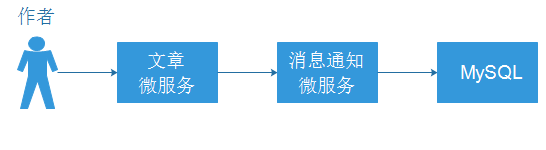
新增文章后,需要通知订阅的用户,文章微服务需要调用消息通知微服务,创建消息。
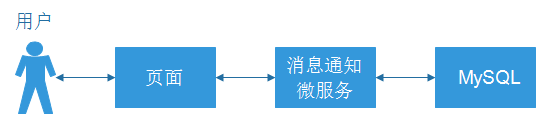
用户登录十次方后,访问的前端页面,页面需要定时轮询通知接口,获取消息。(接口已完成)
新增NoticeClient,调用通知微服务
pom.xml添加依赖
1
2
3
4
5<dependency>
<groupId>org.springframework.cloud</groupId>
<artifactId>spring-cloud-starter-openfeign</artifactId>
<version>2.1.2.RELEASE</version>
</dependency>启动类添加注解
1
在com.tensquare.article.client中编写NoticeClient,把消息通知的Notice类复制到文章微服务
1
2
3
4
5
6
7
8
9
10
11
public interface NoticeClient {
/**
* 添加消息
* @param notice
* @return
*/
public Result add( Notice notice) ;
}添加Notice的实体类在com.tensquare.article.pojo中
修改ArticleService的save方法,进行消息通知
1
2
3
4
5
6
7
8
9
10
11
12
13
14
15
16
17
18
19
20
21
22
23
24
25
26
27
28
29
30
31
32
33
34
35
36
37
38
39
40
41
42
43
44
45
46
47public void save(Article article) {
//TODO: 使用jwt鉴权获取当前用户的信息,用户id,也就是文章的作者id
String userId = "3";
article.setUserid(userId);
//使用分布式id生成器
String id = idWorker.nextId() + "";
article.setId(id);
//初始化点赞,浏览量,评论数据
article.setVisits(0);
article.setComment(0);
article.setThumbup(0);
//新增
articleDao.insert(article);
//新增文章后需要创建消息通知给订阅者
//获取订阅者信息
//存放作者订阅者信息的集合key,里面存放订阅者id
String authorKey = "article_author_" + article.getUserid();
Set<String> set = redisTemplate.boundSetOps(authorKey).members();
//给订阅者创建消息通知
for(String uid:set){
//创建消息对象
Notice notice = new Notice();
//接受消息用户的id
notice.setReceiverId(uid);
//进行操作用户的id
notice.setOperatorId(userId);
//操作类型(评论,点赞等)
notice.setAction("publish");
//被操作的对象,例如文章,评论等
notice.setTargetType("article");
//被操作对象的id,例如文章id,评论id
notice.setTargetId(id);
//通知类型
notice.setType("sys");
noticeClient.save(notice);
}
}进行测试
需要开启tensquare-eureka,tensquare-user,tensquare-article,tensquare-notice四个微服务进行测试
5 文章点赞 - 实现点对点消息功能
5.1 实现文章点赞
编写ArticleController添加点赞方法:
1 | // 文章点赞 //http://localhost:9004/article/thumbup/{articleId} |
5.2 实现点赞消息通知
编写ArticleService
1 | //文章点赞 |
6 基于db实现的通知系统存在的问题
6.1 消息通知系统的构成
一个消息通知系统,其主要的构成有消息发送者,消息存储,消息接收者,新消息提醒机制
6.1.1 消息发送者
消息是由系统的操作者发出的吗?不一定。
消息发送的常规流程:
- 系统的开发者设置了某种消息发送的规则,规则中包含一些条件
- 规则中的条件都满足后,触发系统生成消息数据
- 系统将消息数据保存并推送给接收者
以前面文章订阅群发消息作来举例的话
规则:
1.1 用户订阅文章作者
1.2 文章作者发布了新文章
上面规则中的两个条件都满足后,系统就生成消息通知并推送给接收者,告诉接收者有新的文章
在这个例子中,消息真正的发送者是消息通知系统,而非操作者。
用户提前为系统设定好规则,系统按照规则发送消息。
6.1.2 消息存储
消息通知的存储包含消息通知实体数据的存储和新消息提醒数据的存储。
- 消息通知实体数据保存在tb_notice表中的数据
- 新消息提醒数据保存在tb_notice_fresh表中的数据
6.1.3 消息接收者
也就是消息的阅读者,是一条消息通知的最终目的地。
6.1.4 新消息提醒机制
系统产生新的消息通知后,必须有一个合理的机制或者方法来告知接收者有新的消息。否则接收者会郁闷且痛苦地在茫茫的数据海洋中手动去查找新消息。可以使用以下两种方式提醒新消息:
- 提醒新消息的数量
- 消息通知列表中新消息置顶并标记
6.2 现在消息通知存在的问题
6.2.1 数据库访问压力大
用户的通知消息和新通知提醒数据都放在数据库中,数据库的读写操作频繁,尤其是tb_notice_refresh表,访问压力大。
6.2.2 服务器性能压力大
采用页面轮询调接口的方式实现服务器向用户推送消息通知,服务器的接口访问压力大。
6.2.3 改进的方法
- 使用 rabbitmq 实现新消息提醒数据的缓存功能,替代tb_notice_refresh表
- 使用全双工长连接的方式实现服务器向用户推送最新的消息通知,替换轮询
- 页面使用websocket
- 微服务端使用异步高性能框架netty