了解HTML的基本属性
1.表格
1.1 \ 和\<和\>
| 标签 |
功能 |
| \ |
显示“ ”符号 |
| \< |
显示“<”号 |
| \> |
显示“>”号 |
1.2 table表格
table标签包括tr(行)、td(单元格)、th(单元格,比td多的是加粗和居中)
1
2
3
4
5
6
7
8
9
10
11
12
13
14
15
16
17
18
19
20
21
22
23
24
25
|
<table align="center" border="1px" width="300px" height="20px">
<tr align="center">
<td>a</td>
<td>b</td>
<td>c</td>
<td>d</td>
</tr>
<tr align="center">
<td>e</td>
<td>f</td>
<td>g</td>
<td>h</td>
</tr>
<tr align="center">
<td>i</td>
<td>j</td>
<td>k</td>
<td>l</td>
</tr>
</table>
|
1.3 colspan和rowspan合并
| 标签 |
用法 |
| colspan |
删除下面的一行 |
| rowspan |
删除谁都可以 |
1.4 thead和tbody和tfoot
2.超链接或热点接
超链接使用:\\,href(hot reference 热引用)
超链接的特点:有下划线,鼠标放上去是个小手
超链接有个target属性:
| 值 |
作用 |
| _blank |
新窗口打开 |
| _self |
当前窗口打开(默认方式) |
| _top |
顶级窗口打开 |
| _parent |
父窗口打开 |
图片超链接:\![]()
3.列表
1
2
3
4
5
6
7
8
9
10
11
12
13
14
15
16
17
18
19
20
21
22
23
24
25
26
27
28
29
30
|
<ol type="I">
<li>水果</li>
<ol type="A">
<li>苹果</li>
<li>西瓜</li>
<li>草莓</li>
</ol>
<li>蔬菜</li>
</ol>
<ul type="circle">
<li>中国</li>
<ul type="square">
<li>北京</li>
<li>河南</li>
<ul type="disc">
<li>洛阳</li>
<li>郑州</li>
<li>济源</li>
<li>商丘</li>
</ul>
<li>宁夏</li>
<li>广东</li>
<li>西安</li>
</ul>
<li>美国</li>
<li>英国</li>
</ul>
</ul>
|
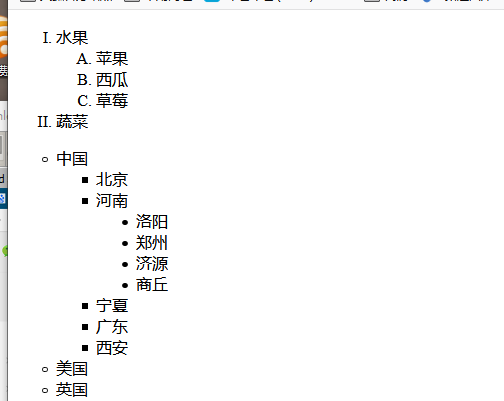
显示效果如下:
4.表单
用于收集用户信息,点击提交按钮提交数据给服务器
1
2
3
4
5
6
7
8
9
10
11
12
13
14
15
16
17
18
19
20
21
22
| <form>
<table border="1px">
>
<tr>
<td>用户名</td>
<td><input type="text" name="username" /></td>
</tr>
<tr>
<td>密码</td>
<td><input type="password" name="userpwd" /></td>
</tr>
<tr align="center">
<td colspan="2">
<input type="submit" value="登陆" />
<input type="reset" value="清空" />
</td>
</tr>
</table>
</form>
|
以下是完整的表单提交例子:
1
2
3
4
5
6
7
8
9
10
11
12
13
14
15
16
17
18
19
20
21
22
23
24
25
26
27
28
29
30
31
32
33
34
35
|
<form action="#" method="post">
用户名
<input type="text" name="username" /><br>
密码
<input type="password" name="userpwd" /><br>
确认密码
<input type="password" /><br>
性别
<input type="radio" name="gender" value="1" checked />男
<input type="radio" name="gender" value="0" />女<br>
兴趣爱好:
<input type="checkbox" name="interest" value="smoke" />抽烟
<input type="checkbox" name="interest" value="drink" />喝酒
<input type="checkbox" name="interest" value="fireHair" />烫头<br>
学历
<select name="grade">
<option value="小学">小学</option>
<option value="初中">初中</option>
<option value="高中" selected>高中</option>
<option value="专科">专科</option>
<option value="本科">本科</option>
</select><br>
简介
<textarea rows="10" cols="60" name="introduce"></textarea>
<br>
<input type="submit" value="注册" />
<input type="reset" value="清空" />
</form>
|
5.下拉列表支持多选
multiple支持多选,size设置条目数量
1
2
3
4
5
6
7
| <select multiple="multiple" size="3">
<option >河南省</option>
<option >河北省</option>
<option >山西省</option>
<option >山东省</option>
<option >陕西省</option>
</select>
|
6.控件
1.file控件
文件上传专用
2.hidden控件
1
| <input type="hidden" name="userid" value="111">
|